

You open Spectrum to watch your favorite piece of entertainment, but alas! You get an error. One of these Spectrum cable box error codes is the Code ia01. What is it, what causes it, and how to fix Spectrum Error Code ia01? We find out.
Spectrum is a streaming service that allows you to watch your favorite shows, channels, or movies from several channels. This service offers 80 tracks, over 250+ DVR rentals, and 25000 thousand hours of on-demand entertainment available to stream from. It is known for multiple devices and works well with smart TVs, smartphones, tablets, streaming devices, and computers. There’s no doubt that it is an excellent service, but like any other app, it too is not devoid of errors. Spectrum Error Code ia01 is one of such mistakes that obstructs the smooth working of the app.
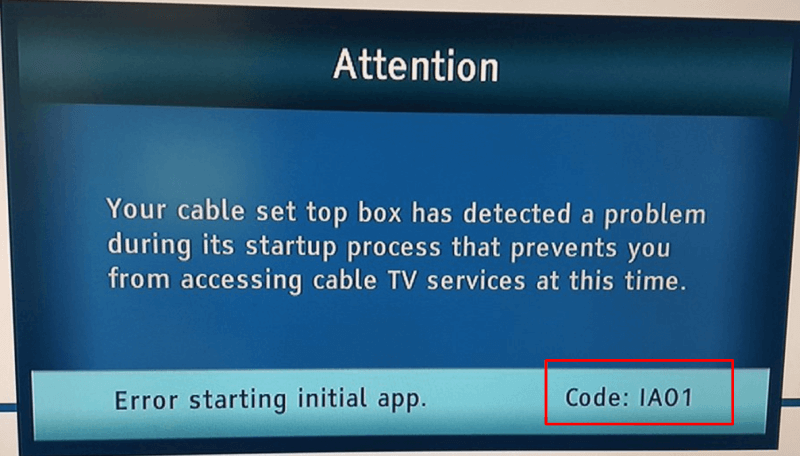
Causes of Spectrum Error ia01
There can be multiple reasons for the Spectrum cable box not working. The most common causes of this error are:
- It can occur due to weak internet connectivity or any other internet connection issues.
- The issue might occur because of poorly connected cables.
- Another reason could be that the Spectrum device or a channel cannot get a signal from your TV.
- Also, this error code can show up when some misconfigured file that you were trying to open is removed.
Now, how to fix this issue? I am listing some tried and tested methods that can help you troubleshoot the Spectrum error code ia01.
How to fix Spectrum error code ia01?
Restart the Cable Box
It is one of the necessary steps that people generally use while facing an issue with their set-top box, i.e., restarting the set-top box. Go ahead and restart your Spectrum receiver (cable box). Doing so will refresh its memory and try to establish a new connection. Just turn off your cable box and hold up for a few seconds to let it shut down properly. After that, please turn it on again and connect with the network.
Check Cables
As mentioned in the causes of Spectrum error code ia01, one reason can be loosely connected cables. If you are a new user or have modified the equipment recently, you must consider checking the cable connections to eliminate this issue. Check all the cable and ports and ensure that they are intact in proper form and are fitted correctly. If you have cables connected with a device in another section of your house, ensure that those cables are not damaged and are correctly connected.
Reset the Spectrum Equipment
Another way to resolve this issue is by resetting the Spectrum equipment. To reset equipment, you will need to access your Spectrum account online. Here are the steps to follow:
- Firstly, you need to login to your Spectrum account by entering your username and password.
- When you are in your account, go to the Service tab and select the TV option.
- In the TV menu, find the Experiencing Issues option and click on it.
- Finally, select the Reset Equipment option. Doing so will reset the device and establish a new signal.
Check Internet Connectivity
Internet connectivity can be another cause of this error. So, ensure that your internet is properly working, and in case it is not, contact your internet service provider to fix your internet connection issues.
Spectrum Customer Support
If none of the above methods works for you, you can contact the Spectrum Customer Support for assistance. They will provide you with the right information and guide you properly to fix any issue.
Conclusion
Error code ia01 could be an annoying issue when you are trying to watch your favourite TV show or enjoying an edgy thriller on your device. It happens due to weak internet connectivity or incorrectly connected cables, or there can be some other reason too. In this article, I have shared some troubleshooting solutions on how to fix Spectrum error code ia01.
Please let us know in the comments section which of the above methods worked for you. It might be beneficial for other users seeking a solution. You can also let us know if you have any further queries.
