

Gmail is the most popular free web-based email service owned by Google LLC. It is used for both commercial and private use. Over time, it has only enhanced its feature sets which include scheduling emails, separate email tabs, notifications, customization features, bookmark emails, filter out spam emails, and many more. One of its many features also includes “blocking” a user whose mails you don’t want to receive. If someone is annoying you, you directly block him/ her on Gmail.
But, What Happens When Someone Blocks You on Gmail?
When someone blocks you on Gmail, the emails you send to him/ her go directly to that person’s junk or spam mails. So, he can’t really see your emails unless he goes to his spam section. The other person who is blocked doesn’t receive any notification of being blocked. So, he might continue sending mail to a person who has blocked him and keep wondering about why he hasn’t got any reply.
Can You Confirm if Someone Blocked you on Hangouts?
Yes, there is a way to do so. Although, there is no direct feature or tool that tells you that you are blocked by someone on Gmail, you can still find out if someone blocked you on Gmail.
You being blocked on Gmail also affects your Gmail chat. If you guys had chats on Gmail previously, it can be assumed that he/ she will block you from both Gmail and chat. Gmail has an integrated text, audio, & video chat feature which is called Google Hangouts. Let us first know about this app.
Google Hangouts is a free Instant Messaging (IM) app for Gmail users. It is one of convenient mediums for conducting chats and meetings amongst colleagues of the same business domain. Although, it can be used by any Gmail user for any purpose. It also includes a feature to block someone if he/ she is annoying you or you just don’t want to receive any messages from a particular person. But, what about the person who is at the receiving end i.e., who is blocked. How can he/ she confirm if someone has blocked him/ her on Gmail? Is there a way that a blocked person can be certain about being blocked by someone? How to tell if someone blocked you on gchat / Hangouts?
If you are the one who wants to clear doubts about being blocked by someone, this tutorial will surely help. In this tutorial, I will be showing you how to know if someone blocked you on Gmail. Let’s get started.
How to Confirm if Someone Blocked you on Gmail:
Gmail chat or Hangouts is available for multiple platforms. You can use it on Windows PC, iPhone, Android, web, and other devices.
For Desktop Users
Method 1:
Follow the below steps to confirm if someone has blocked you on Gmail:
- Open Gmail in a web browser on your PC.
- From your chat list, open chat of the person you suspect has blocked you.
- Simply send him/ her a message and as you text the person, you will directly get a message that the person has blocked you.
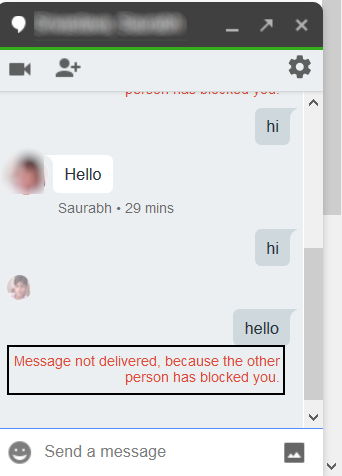
From this, you can conclude that the person has blocked your emails as well.
Method 2:
If you want to know if someone blocked you on Gmail without messaging him on chat/ Hangouts, then you can follow this approach. In this method, I will be sharing a method to confirm if someone blocked you on Gmail on Desktop without you messaging that person. The steps to do so are as follows:
- First, open Gmail in a web browser on your PC and log in to your Gmail account.
- Along with email tabs and various options, you will see a Google chat list with users you chatted with in the past.
- Besides the Chat list, there is a Hangouts Contact list where you can view users you previously had a chat with.
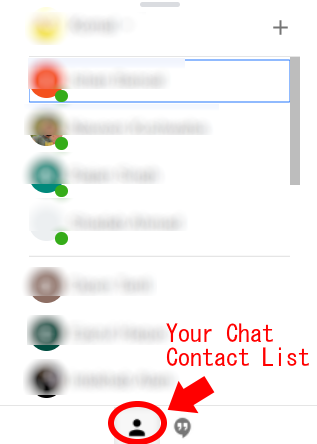
- You need to scroll down to this contact list and try to find out the person you assume has blocked you. If the person was showing up before but doesn’t show now, you can be sure that he/ she has blocked you. Else, you might stop thinking you are blocked.
For Mobile Users
If you use Gmail on your phone, there is a way to find if someone has blocked you. Follow below steps:
- First, you must have the Hangouts app on your phone as the Gmail app won’t show you the chats. Hangouts is by default pre-installed on the latest Android, but in case you don’t have it, go to Play Store and find and install the Hangouts app from there. Similarly, iPhone users can find it on the App Store and install it on their phone.
- After downloading Hangouts on the phone, get started with the app and log in with any of your Gmail accounts. You can directly sync Hangouts with an added Gmail account on your device.
- As you log in, your Gmail chats will appear on your mobile screen.
- Go to the person’s chat who you think has blocked you and message him directly. As you do that, you will receive a message “Failed to Send”.
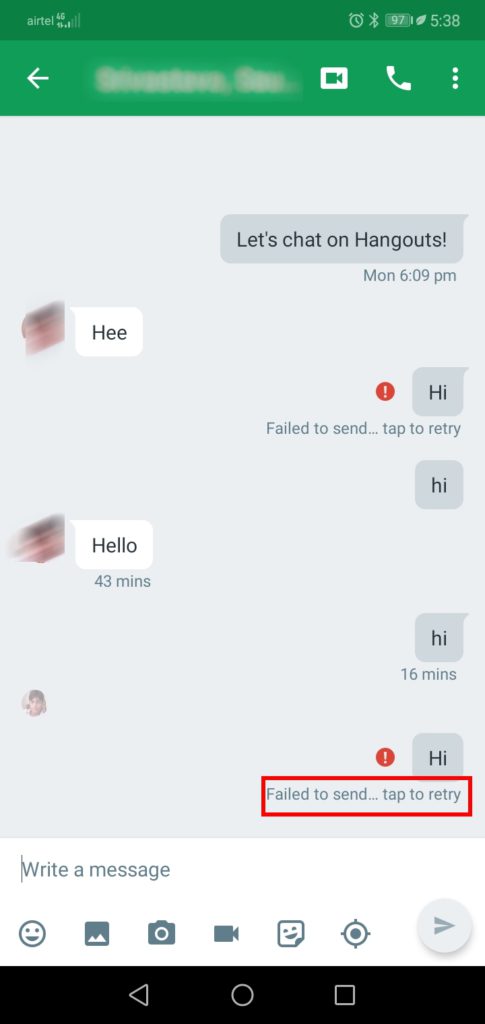
You can now be confirmed that the person has blocked you on Gmail.
So, in this article, we showed you how to confirm if someone blocked you on Gmail and Hangouts. You can know that by both messaging and without messaging the person in question. The choice is yours.
