

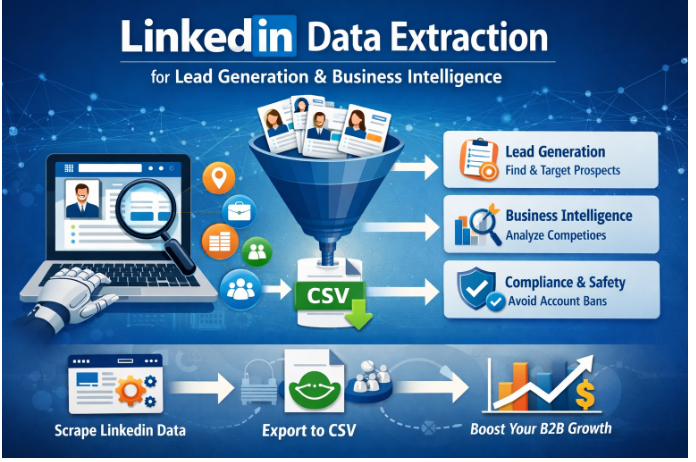
Every professional has tried at least once in their career to try and manually copy their LinkedIn connections to spreadsheets. Same goes for businesses. So, what can be done to solve this issue? The prime solution is using a LinkedIn Data Extraction tool, or LinkedIn Scraper in short.
The catch? You need to know what you’re doing or you’ll get your account banned within a week. It saves you precious time and money that you could be using elsewhere. Here’s how to extract LinkedIn data without killing your account in the process.
What Is LinkedIn Data Extraction?
LinkedIn data extraction helps you grab organized info from profiles without having to go through each one individually. Instead of clicking through a bunch of profiles, you can easily gather names, job titles, work experience, locations, company sizes, industry types, and engagement stats all at once.
And, Why Does It Matter for B2B Growth?
B2B lead generation at scale is the obvious one. You can knock out a list of 500 VP-level prospects in just one afternoon instead of dragging it out for a whole month.
Account-based marketing really benefits from having a good sense of how the organization is structured. Gathering info about employees helps you figure out who reports to who and identify the key players in the companies you’re targeting.
Recruitment teams build talent pipelines automatically, sourcing candidates by skill and location. Competitive intelligence comes from tracking where competitors are hiring and how fast teams are growing. Business intelligence means validating customer personas with real data and spotting emerging market segments before your competitors.
How Does LinkedIn Scraping Actually Work?
There are three ways to extract LinkedIn data.
Browser-based automation tools run inside your browser while you’re logged in, mimicking your mouse clicks and keyboard input. This is the most accessible method because it looks exactly like human behavior to LinkedIn’s systems.
Cloud-based scrapers operate on remote servers. They’re faster but easier for LinkedIn to detect because traffic patterns don’t perfectly match human browsing.
API-based solutions pull structured data through official or unofficial APIs. Great for CRM integrations, but limited by what LinkedIn exposes.
For tactical scraping where you want volume without getting flagged, browser automation wins. It scales well while keeping detection risk manageable.
The workflow is straightforward. Define target filters (industry, job title, location, company size, seniority). Configure your scraper with search criteria or profile URLs. Run extraction in batches to avoid rate limits. Export to CSV or sync to your CRM. Clean and validate data by deduplicating and standardizing fields.
Where to Source Your LinkedIn Data
Free LinkedIn search gives you basic filters—location, industry, connection degree. It works for small-scale scraping but limits precision.
Sales Navigator is where serious B2B prospecting happens. Advanced filters let you narrow by company headcount, technology usage, seniority levels, and job functions. If you’re scraping at real volume, Sales Navigator pays for itself in targeting precision.
Beyond search, scrape company pages and employee directories, group member lists, event attendees, post engagement data, and follower lists. Each serves different purposes—groups for community building, engagement for intent signals, directories for account mapping.
Using Extracted Data for Lead Generation and Intelligence
Raw data sitting in a CSV does nothing. What matters is how you use it.
Sync extracted LinkedIn data into your CRM to build segmentation lists and trigger automated outreach. When prospects change jobs (catch this by re-scraping quarterly), your system flags them for re-engagement. Job changes are prime time to reach out—they’re evaluating new vendors.
Personalization tactics
Most people fail here. They have job titles, company context, mutual connections, and recent activity in their database but still send generic requests.
Use what you extracted. Reference specific experience from their profile. Mention a mutual connection by name. Comment on a post they shared last week. “I saw your profile” gets ignored. “I noticed you just moved from X to Y and wanted to connect because…” gets responses.
Multi-touch outreach sequences
Solid LinkedIn outreach: view profile (they get notified) → personalized connection request → initial message upon acceptance → follow up after 3-5 days if no reply → move to email if LinkedIn goes cold.
Each step should reference something from their profile data. That’s why you extracted it.
Measuring performance
Connection acceptance should hit 30-40% if targeting is tight and personalization is real. Reply rates on cold outreach sit around 10-15% industry-wide.
Meetings booked and pipeline influenced are your real KPIs. Revenue attribution from LinkedIn-sourced leads tells you if this operation is worth the compliance risk.
For business intelligence, scrape competitor profiles to map market presence, track hiring trends, validate personas, and identify expansion signals like rapid hiring at target accounts.
Critical Compliance and Safety Considerations
LinkedIn explicitly prohibits automated scraping in their ToS. The risks: account suspension, permanent bans, IP blocking, and legal exposure depending on jurisdiction.
Courts have ruled scraping publicly available data may be permissible in some cases, but LinkedIn will still ban your account if they catch you. They actively monitor for automation.
This isn’t a reason to avoid scraping. It’s a reason to do it right.
Extract only publicly visible data. Don’t scrape private information. Collect only what you’ll use. Include opt-out mechanisms in outreach. Store data securely and delete it when done. If you’re targeting EU citizens, GDPR compliance isn’t optional.
Account health and detection avoidance
If you get flagged, you lose everything—your scraping infrastructure and possibly your personal account.
Daily limits that won’t get you banned: 80-100 profile views per day max. Connection requests stay under 20-30 per week (new accounts), 50-70 per week (aged accounts). Messages cap at 50-80 per day. Search queries under 100 daily.
These are hard limits based on what triggers LinkedIn’s detection.
Mimicking human behavior is non-negotiable. Add random delays between actions (15-45 seconds minimum, not fixed). Vary activity patterns—don’t scrape at the same time daily. Mix manual and automated activity. Ramp up volume gradually over 2-3 weeks for new accounts. Take breaks. Don’t run scraping overnight for days on end.
Warning signs you’re flagged: Frequent CAPTCHAs, restricted search results, temporary action blocks, or your profile views stop appearing in “Who’s Viewed Your Profile.”
If flagged, pause automation for 7-14 days minimum. Reduce daily limits by 50% when resuming. Increase randomization and delays. Consider residential proxies or mobile connections—LinkedIn trusts mobile IPs more.
Best Practices for LinkedIn Scraping Success
- Start with clear targeting. Define your ideal customer profile first. Narrow filters yield higher quality leads. A list of 200 perfectly targeted VPs beats 5,000 random profiles.
- Prioritize quality over volume. Extract only fields you’ll use. If you won’t use education history for personalization, don’t scrape it.
- Keep data fresh. People change jobs every 2-3 years. Re-scrape quarterly to catch job changes and promotions. Stale data kills conversion rates.
- Combine scraping with enrichment. LinkedIn doesn’t display most emails publicly. Use third-party enrichment to append verified contact info based on names and companies.
- Test and iterate. Start with 50-100 profiles. Measure acceptance and reply rates. Refine targeting and messaging. Then scale gradually. Don’t jump from zero to 1,000 profiles daily.
Lastly, know when scraping doesn’t make sense. For C-suite at Fortune 500s, manual research often wins because you can craft genuinely personalized outreach. For pre-verified contacts where you need emails immediately, B2B data platforms might beat scraping.
Best Setup for LinkedIn Scraping in 2026
Tools like LinkedIScraper enable browser-based automation while maintaining account safety through built-in rate limiting and randomization features. You just have to balance extraction speed with detection avoidance. Don’t do too much on new accounts, don’t do too much in a day or week. Slower, more human-like scraping protects your account long-term. There’s a good chance you won’t get your account back once detected for some serious scraping.
Frequently Asked Questions
Is LinkedIn scraping legal?
Publicly available data extraction exists in a legal gray area. LinkedIn’s ToS prohibit it, but courts have ruled scraping public data may be permissible under certain circumstances. Consult legal counsel for your jurisdiction. Focus on ethical use and user privacy.
Can I extract email addresses from LinkedIn?
LinkedIn heavily restricts email visibility. Most profiles don’t show emails publicly. Scrape names and companies, then use enrichment services to append verified emails.
How much can I scrape per day without getting banned?
Conservative limits: 80-100 profile views, 20-30 connection requests per week, 50-80 messages daily. Aged accounts (6+ months old) can push slightly higher. New accounts start at 50% and ramp up slowly.
Do I need Sales Navigator to scrape LinkedIn effectively?
No, but Sales Navigator’s advanced filters (company size, technology stack, seniority) dramatically improve targeting. Free LinkedIn works for basic scraping. Sales Navigator pays off for serious B2B prospecting at scale.
Final Thoughts
LinkedIn data extraction powers modern B2B growth when executed strategically and ethically. The businesses that win combine tactical scraping with sharp targeting, strong personalization, and rigorous compliance.
Start conservatively with low volumes. Monitor account health obsessively. Scale gradually as you prove your targeting works. The goal isn’t to spam thousands of prospects—it’s to use LinkedIn data to inform smarter outreach, build better pipelines, and close deals faster.
Focus on quality extraction over volume. Respect privacy boundaries and platform rules. Measure outcomes relentlessly. That’s how you turn LinkedIn scraping from a risky short-term tactic into a sustainable growth engine that generates revenue.
